Series Overview: Welcome to the central hub for the Salesforce Appointment Scheduler development series. This article outlines the system architecture, foundational engineering principles, and serves as the living master index for every installment in the project.
Project Overview: The Real-World Challenge
When multi-location service organizations handle incoming customer requests, coordinating appointments across regional branches is notoriously difficult. Front-desk teams, contact centers, and service managers must balance several moving pieces simultaneously:
- Proximity: Identifying the nearest physical branch to the customer’s home address without third-party geocoding latency.
- Skill Alignment: Ensuring that branch staff possess the specific qualification required for the requested service.
- Schedule Availability: Checking weekly shift hours, lunch breaks, and existing appointments in real time to avoid double-bookings.
- Operational Follow-Through: Creating follow-up reminders and notifying staff immediately upon confirmation.
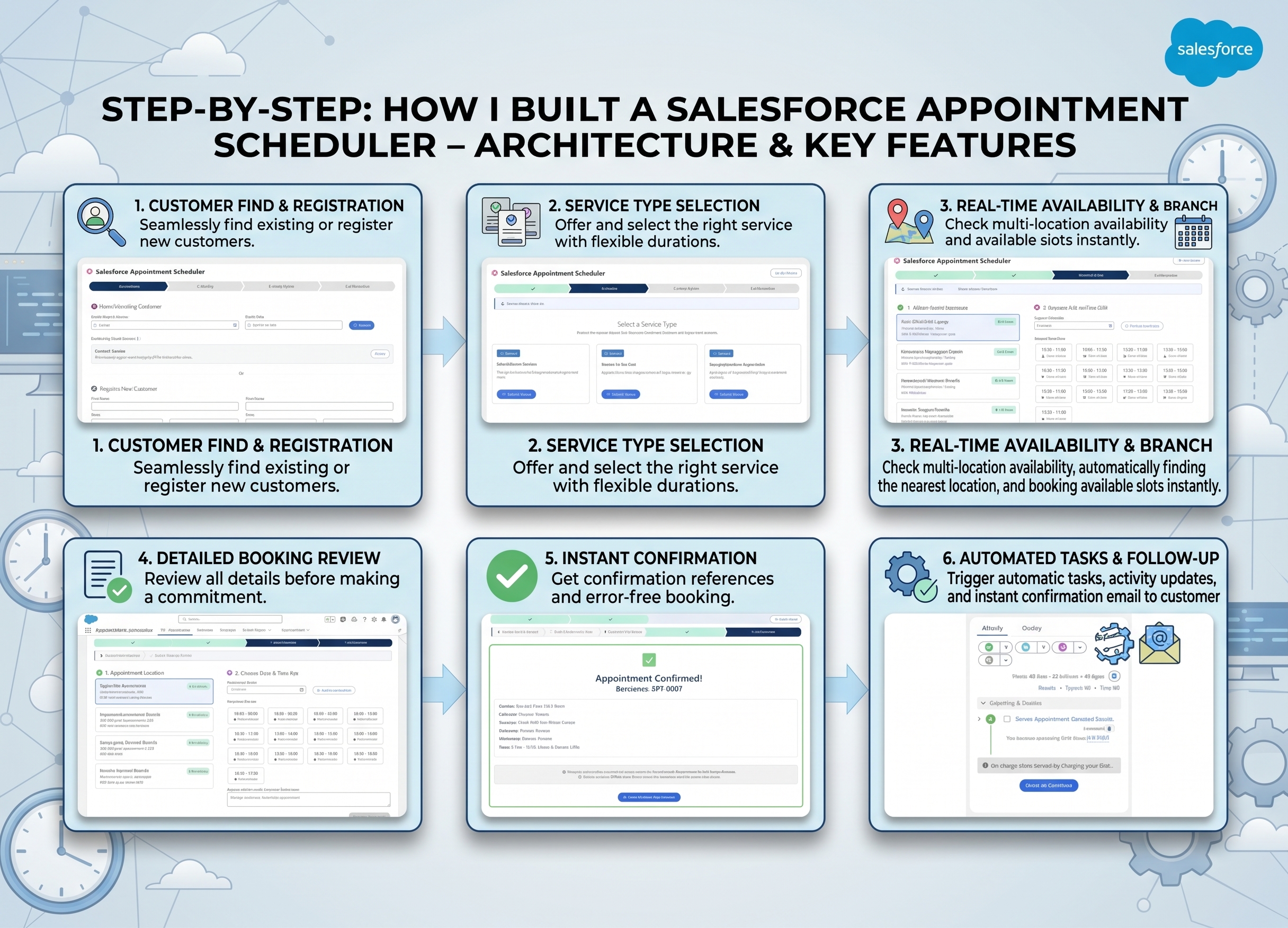
To solve this, we are building the Salesforce Appointment Scheduler—a multi-location appointment booking platform designed for headquarters coordination teams to manage customer service inquiries and schedule regional appointments seamlessly.
Beyond delivering functional business value, this project serves a second, equally important purpose: demonstrating modern, developer-first Salesforce DX engineering. Throughout development, we put Hob: The Salesforce House-Elf (hob) to work, eliminating repetitive boilerplate chores across schema scaffolding, permission set authoring, Apex test factories, service classes, and Lightning Web Components.
Core Architectural Principles
Too often, Salesforce applications fall into common architectural traps: reinventing standard CRM objects with custom fields, assigning System Administrator profiles during development, bundling monolithic test utilities that burn governor limits, or writing hundreds of lines of boilerplate XML by hand.
The Appointment Scheduler follows four core engineering principles:
1. Maximize Native Platform Capabilities
Before creating custom fields or code, we ask what standard Salesforce already provides:
Account.ShippingAddress(ShippingStreet,ShippingCity,ShippingPostalCode): Represents the branch location address. Because it is a native compound address field, Salesforce provides built-in platform geocoding (ShippingLatitude,ShippingLongitude). This enables direct SOQLDISTANCE()calculations without external mapping APIs or custom mathematical Apex loops.Contact.MailingAddress: Captures customer location using standard CRM address fields.Contact.AccountId: Directly associates qualified staff members with their primary branch location.Task: Generates native Salesforce activities for staff follow-up (WhatId→ Appointment,WhoId→ Contact).
2. Least-Privilege Security from Day 1
We never build features assuming “System Administrator” rights. Every custom object, field, and controller is scoped into dedicated permission sets (Appointment_Scheduler_Operator), catching Field-Level Security (FLS) bugs in scratch orgs long before reaching production.
3. Governor-Limit-Conscious Test Hygiene
Rather than bloating execution times and burning governor limits with redundant database writes, we enforce a strict separation between in-memory unit test fixtures (build) and persisted database records (create). Pure business logic and slot calculation tests run in milliseconds without consuming DML or SOQL limits.
4. Developer Velocity with CLI Scaffolding
By pairing the official Salesforce CLI (sf) with Hob (hob), we eliminate setup click fatigue and manual XML authoring. Schema creation, permission sets, test data factories, and LWC bundles are scaffolded in seconds with deterministic metadata.
Domain Architecture & Data Model
The Appointment Scheduler domain model combines lightweight custom entities with standard CRM objects:
| Entity | Type | Purpose | Key Attributes |
|---|---|---|---|
Account | Standard Object | Branch Locations (RecordType: Location) | ShippingAddress (native geocoding), Active__c |
Contact | Standard Object | Customers & Staff (RecordType: Customer / Location_Staff) | MailingAddress, AccountId (Branch link for staff) |
Service_Type__c | Custom Object | Catalog of available service offerings | Name, Duration_Minutes__c, Description__c, Active__c |
Staff_Service_Type__c | Custom Object | Junction mapping staff qualifications to service types | Staff__c (Lookup), Service_Type__c (Lookup), Active__c |
Staff_Working_Hours__c | Custom Object | Weekly recurring shift schedules for staff members | Staff__c (Lookup), Day_of_Week__c, Start_Time__c, End_Time__c |
Appointment__c | Custom Object | Core booking transaction (APT-{0000}) | Lookups to Customer, Location, Staff, Service Type, Start_Time__c, End_Time__c, Status__c |
Task | Standard Object | Automated staff follow-up activity | WhatId → Appointment, WhoId → Staff Contact |
Entity Relationship Diagram (ERD)
  +------------------+         has staff (AccountId)         +----------------------+
  |     ACCOUNT      |------------------------------------->|       CONTACT        |
  | (Location Branch)|                                      | (Staff / Customer)   |
  +------------------+                                      +----------------------+
           |                                                           |
           | held at branch (Location__c)                              | staff skills / weekly shift
           v                                                           v
  +------------------+       service booked                 +----------------------+
  |   APPOINTMENT    |<-------------------------------------|     SERVICE_TYPE     |
  |   APT-{0000}     |                                      |   Duration_Minutes   |
  +------------------+                                      +----------------------+
           |                                                           ^
           | generates follow-up (WhatId)                              | qualified for
           v                                                           |
  +------------------+                                      +----------------------+
  |       TASK       |                                      |  STAFF_SERVICE_TYPE  |
  | (Standard CRM)   |                                      |   (Junction Skill)   |
  +------------------+                                      +----------------------+
The Master Series Index
This series walks step-by-step through every phase of building the Appointment Scheduler, sharing practical architecture patterns, real-world CLI workflows, and open-source tooling feedback.
| Part | Title | Focus & Key Hob Workflows | Status |
|---|---|---|---|
| Part 1 | Eliminating Salesforce XML Fatigue — CLI Schema Scaffolding with Hob | Foundational data model, native compound geocoding, and instant CLI schema generation (hob create object, hob create field). | Published |
| Part 2 | Instant Least-Privilege Access — Generating Permission Sets with Hob | Least-privilege access, multi-object security scaffolding, and universally required field FLS rules (hob create permset). | Published |
| Part 3 | Standardizing Test Hygiene — In-Memory vs DML Factories with Hob | Taming governor limits, in-memory (build) vs database (create) test factories, and demo seeding (hob create factory, hob seed init). | Published |
| Part 4 | High-Velocity TDD — Companion Test Scaffolding with Hob | Core domain services (CustomerService, LocationService, AvailabilityService, AppointmentService), row-locking concurrency, and proximity ranking (hob create apex --with-test). | Published |
| Part 5 | Architecture by Default — Separation of Concerns with Hob Triggers | Logic-less triggers, automated standard Task generation, email notifications, and cancellation lifecycle (hob create trigger). | Published |
| Part 6 | Building Modern Lightning UIs Fast — Scaffolded LWCs with Hob | Multi-step booking wizard state machine (appointmentWizard), child component composition, and Lightning App packaging (hob create lwc). | Published |
| Part 7 | One Command to Rule Them All — The Complete Dev Org Setup with Hob | End-to-end developer experience: automated scratch org provisioning, deployments, demo data seeding, and smoke testing (hob scratch new, hob hearth, hob scratch purge). | Published |
Quick Start & Developer Setup
If you want to explore the repository locally or deploy it to a scratch org, follow these quick steps:
The One-Command Setup (Recommended)
With Hob, spin up a complete scratch org, deploy all metadata, assign permissions, seed realistic data, and launch your browser in a single step (see Part 7):
hob scratch new appointment-dev \
  -p Appointment_Scheduler_Operator \
  -s scripts/apex/seed.apex
Manual Step-by-Step Setup
Alternatively, you can run each step manually:
1. Deploy the Metadata
Deploy the source format metadata to your active scratch org or sandbox:
hob deploy devhub
# or using the Salesforce CLI:
sf project deploy start
2. Assign the Operator Permission Set
Grant least-privilege operator access to your testing user:
sf org assign permset -n Appointment_Scheduler_Operator3. Seed Realistic Demo Data
Populate 4 nationwide branch locations (London Flagship, Birmingham Colmore, Manchester Deansgate, Leeds Park Row), 8 full-time and part-time staff members with varied shift patterns, regional customer contacts, service catalog offerings, and starter appointments:
sf apex run --file scripts/apex/seed.apex
# or using Hob's seed command:
hob seed --apex scripts/apex/seed.apex
4. Open the Scratch Org
hob open
# or:
sf org open
Complete Engineering Series
All seven parts of this series are now published above. Every architectural layer—from geolocation schema modeling to LWC state machines and zero-touch scratch org orchestration—is fully documented with reproducible CLI workflows and open-source code in the Salesforce Appointment Scheduler repository.