In our earlier articles on why we avoid heavy CMS platforms and building fast websites with Astro, Tailwind CSS, and Cloudflare, we explained why pre-rendered static architecture outperforms traditional database-driven platforms in speed, security, and long-term maintenance.
Whenever we propose a static, Git-backed website to a business, association, or non-profit organisation, one practical question always comes up:
“A Git repository is great for developers, but how do our non-technical editors update pages, upload PDFs, and review drafts—without needing a GitHub account?”
Traditionally, Git-based headless CMS tools (like Decap CMS) required every content editor to create a GitHub account, accept repository invitations, and authorize OAuth apps that granted broad repository permissions directly to their browser. For a local sports club committee, a volunteer board, or a small marketing team, managing individual GitHub accounts is an unnecessary hurdle.
By combining Sveltia CMS, Cloudflare Access (Zero Trust), and a lightweight Cloudflare Pages Function proxy, we can give editors a fast, intuitive web interface at /admin where they log in purely with their email address—while keeping the public site 100% static and every change version-controlled in GitHub.
Here is how this architecture works and how to implement it on an Astro site hosted on Cloudflare Pages.
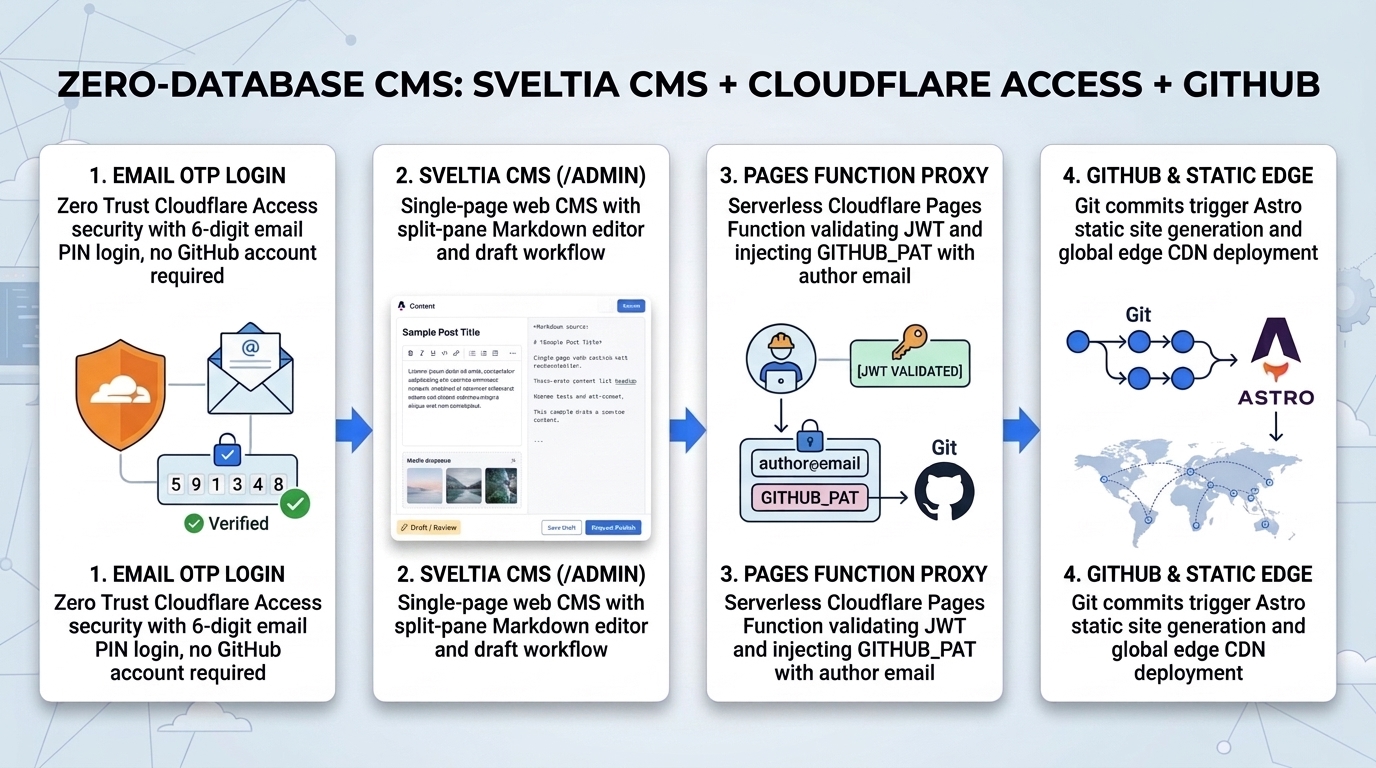
1. System Architecture
The core idea is to decouple editor authentication from Git repository authorization:
- Cloudflare Access handles human authentication at the edge using a simple 6-digit One-Time PIN sent to the editor’s email address (or Google/Microsoft login).
- Sveltia CMS runs in the browser at
/admin, providing a localized visual editor, media library, and editorial workflow. - A Cloudflare Pages Function (
/api/cms/*) verifies the editor’s Cloudflare Access JWT, emulates the CMS authentication handshake, and proxies GitHub API calls using a server-side, repository-scoped token—stamping the editor’s email onto every commit and Pull Request.
┌──────────────────────┐
│    Content Editor    │
│      (Browser)       │
└──────────┬───────────┘
           │ 1. Visits /admin & enters Email OTP
           ▼
┌──────────────────────┐
│  Cloudflare Access   │ ──> Verifies email policy & issues CF_Authorization JWT
│     (Zero Trust)     │
└──────────┬───────────┘
           │ 2. Loads /admin/index.html
           ▼
┌──────────────────────┐
│     Sveltia CMS      │ ──> Visual Markdown editor, media manager & draft workflow
│      (/admin)        │
└──────────┬───────────┘
           │ 3. API requests to /api/cms/github/*
           ▼
┌──────────────────────┐
│   Pages Function     │ ──> Validates CF Access JWT, injects GITHUB_PAT secret,
│   (/api/cms/*)       │     and stamps editor's email as Git commit author
└──────────┬───────────┘
           │ 4. Commits to main or opens Draft PR
           ▼
┌──────────────────────┐
│  GitHub Repository   │ ──> Triggers Cloudflare Pages Preview or Production build
└──────────────────────┘
Why This Stack Works So Well
- 100% Static Public Site: Astro continues to build pure static HTML (
output: 'static') fromsrc/content/. Public visitors never hit a database or server runtime. - Zero GitHub Accounts for Editors: Editors only need their existing email address. Onboarding or offboarding a committee member is a one-line change in your Cloudflare Access policy.
- Zero Exposed Secrets: The browser never holds a real GitHub Personal Access Token. All communication with
api.github.comhappens server-side inside the Cloudflare Pages Function. - Fast, Modern UI with Sveltia CMS: Sveltia CMS is a lightweight, drop-in successor to Decap CMS built with Svelte. It loads almost instantaneously, supports full UI localization (
locale), nested folder trees, split-pane live previews, and a multi-stage Editorial Workflow.
2. Defense-in-Depth Security Model
Consider a typical local sports club—such as a tennis or rowing club. The website usually needs two distinct restricted areas alongside its public pages:
- A private member portal (
/members/*) where club members view court rosters, internal club news, and AGM minutes. - An editorial CMS (
/admin/*) where a handful of committee volunteers update tournament pages, upload PDF entry forms, and publish club announcements.
Because both areas use Cloudflare Access, they should be configured as two separate Access Applications with distinct email policies:
| Area | Protected Paths | Who Can Access | Login Method |
|---|---|---|---|
| Member Portal | /members*, /documents/members/* | All club members (members Access group) | Email OTP (One-Time PIN) |
| CMS Admin & API | /admin*, /api/cms* | Club committee editors (editors Access group, e.g., 3–8 specific emails) | Email OTP or Google / Microsoft |
| Draft Previews | *.club-website.pages.dev | Club committee editors (editors Access group) | Email OTP |
Four Layers of Server-Side Protection
- Edge Gate: Cloudflare Access blocks any unauthenticated request to
/admin/*and/api/cms/*at the edge before your Pages Function even executes. - Cryptographic JWT Verification: Inside
functions/api/cms/_middleware.ts, the Pages Function validates theCf-Access-Jwt-Assertionheader against your Cloudflare Zero Trust public keys (CF_ACCESS_TEAM_DOMAINandCF_ACCESS_AUD). Even if a route were ever misconfigured, the function rejects any request without a valid signed token. - Repository-Scoped GitHub Token: The server-side
GITHUB_PATsecret is a GitHub Fine-Grained Personal Access Token scoped exclusively to the single website repository with onlyContents: Read & WriteandPull requests: Read & Write. Furthermore, the proxy hard-locks outgoing requests to your configuredGITHUB_REPOpath. - Per-User Audit Trail: Even though a single service token communicates with GitHub, the proxy reads the authenticated
Cf-Access-Authenticated-User-Emailheader and injects the editor’s identity into the Git author metadata and commit message (e.g.,Edited by: committee@example-club.org). Every change ingit logand every Pull Request clearly shows which volunteer made the edit.
3. Structuring Collections, Hierarchies, and Media
A common pitfall with CMS setups is giving editors raw access to frontmatter flags that could break site routing or accidentally expose member-only pages to the public. Good CMS architecture prevents mistakes by design.
Sveltia CMS (/admin)
├── 1. Public Pages (src/content/pages)
│   ├── Top-level pages (e.g. /tournaments, /membership)
│   └── Nested subpages (e.g. /tournaments/summer-open)
├── 2. Member Pages (src/content/pages/members)
│   ├── Always scoped under /members/*
│   └── Hidden field: protected: true (enforced automatically)
└── 3. Media Library
    ├── Images (/public/images)
    └── PDF Documents (/public/documents)
Safe Separation of Public and Protected Content
Instead of relying on volunteers to remember to toggle a protected: true checkbox on private club pages, we define two separate collections in Sveltia CMS:
- Public Pages write to
src/content/pages/. - Member Pages write to
src/content/pages/members/and include a hidden field (widget: hidden,default: true) that automatically enforcesprotected: true.
Flexible Page Hierarchy in Astro
In a club website, editors often want to organize pages into parent-child hierarchies—such as placing a new /tournaments/summer-open page under /tournaments and having the header navigation dropdown, parent overview cards, and breadcrumbs update automatically.
By supporting both nested subfolders in Sveltia CMS and an optional parent relation dropdown in the page frontmatter (parent: z.string().optional() in src/content.config.ts), Astro’s navigation utility can resolve multi-level trees effortlessly whether an editor creates a file in a subfolder or selects a parent page from a dropdown.
4. Implementation Step-by-Step
Let’s walk through the files needed to add this CMS setup to an existing Astro project deployed on Cloudflare Pages.
Step 1: Add the Sveltia CMS Entry Point (public/admin/index.html)
Create public/admin/index.html to load Sveltia CMS from a pinned CDN version:
<!doctype html>
<html lang="en">
  <head>
    <meta charset="utf-8" />
    <meta name="viewport" content="width=device-width, initial-scale=1.0" />
    <meta name="robots" content="noindex" />
    <title>Club Website Administration</title>
    <link href="/admin/config.yml" type="text/yaml" rel="cms-config-url" />
  </head>
  <body>
    <script
      src="https://unpkg.com/@sveltia/cms/dist/sveltia-cms.js"
      type="module"
    ></script>
  </body>
</html>
Step 2: Configure Collections & Editorial Workflow (public/admin/config.yml)
Point the github backend’s base_url and api_root to your local Cloudflare Pages Function endpoints (/api/cms and /api/cms/github):
backend:
  name: github
  repo: owner/club-website
  branch: main
  base_url: https://example-club.org
  auth_endpoint: api/cms/auth
  api_root: https://example-club.org/api/cms/github

locale: en
publish_mode: editorial_workflow

media_folder: "public/images"
public_folder: "/images"

collections:
  - name: "pages"
    label: "Public Pages"
    label_singular: "Page"
    folder: "src/content/pages"
    create: true
    nested:
      depth: 3
    slug: "{{slug}}"
    fields:
      - { label: "Title", name: "title", widget: "string" }
      - { label: "Description", name: "description", widget: "text", required: false }
      - label: "Parent Page"
        name: "parent"
        widget: "relation"
        collection: "pages"
        search_fields: ["title"]
        value_field: "{{slug}}"
        display_fields: ["title"]
        required: false
      - { label: "Sort Order", name: "order", widget: "number", default: 10, required: false }
      - { label: "Hide in Navigation", name: "hideInNav", widget: "boolean", default: false }
      - { label: "Featured Image", name: "image", widget: "image", required: false }
      - { label: "Content", name: "body", widget: "markdown" }

  - name: "member_pages"
    label: "Member Portal Pages"
    folder: "src/content/pages/members"
    create: true
    nested:
      depth: 3
    slug: "{{slug}}"
    fields:
      - { label: "Title", name: "title", widget: "string" }
      - { label: "Protected", name: "protected", widget: "hidden", default: true }
      - { label: "Sort Order", name: "order", widget: "number", default: 10, required: false }
      - { label: "Club Document (PDF)", name: "attachment", widget: "file", media_folder: "/public/documents", public_folder: "/documents", required: false }
      - { label: "Content", name: "body", widget: "markdown" }
With publish_mode: editorial_workflow enabled, editors can save work as a Draft, move it to In Review, and click Publish when ready. Behind the scenes, Sveltia CMS manages branches and Pull Requests automatically, and Cloudflare Pages builds a live preview URL for every draft.
Step 3: Verify Cloudflare Access JWTs (functions/api/cms/_middleware.ts)
Every request under /api/cms/* passes through this Cloudflare Pages middleware, which cryptographically verifies the Cf-Access-Jwt-Assertion header and attaches the authenticated user’s email to context.data:
interface Env {
  CF_ACCESS_TEAM_DOMAIN: string; // e.g. "example-club.cloudflareaccess.com"
  CF_ACCESS_AUD: string;         // Application Audience (AUD) Tag
  GITHUB_PAT: string;
  GITHUB_REPO: string;           // e.g. "owner/club-website"
}

export const onRequest: PagesFunction<Env> = async (context) => {
  const jwt = context.request.headers.get('Cf-Access-Jwt-Assertion');
  const email = context.request.headers.get('Cf-Access-Authenticated-User-Email');

  if (!jwt || !email) {
    return new Response('Unauthorized: Missing Cloudflare Access identity', { status: 401 });
  }

  // Verify the JWT signature and audience against Cloudflare Zero Trust certs
  const certsUrl = `https://${context.env.CF_ACCESS_TEAM_DOMAIN}/cdn-cgi/access/certs`;
  const [headerB64, payloadB64, signatureB64] = jwt.split('.');
  const payload = JSON.parse(atob(payloadB64.replace(/-/g, '+').replace(/_/g, '/')));

  const audList = Array.isArray(payload.aud) ? payload.aud : [payload.aud];
  if (!audList.includes(context.env.CF_ACCESS_AUD)) {
    return new Response('Forbidden: Invalid Access Audience', { status: 403 });
  }

  if (payload.exp && Date.now() / 1000 > payload.exp) {
    return new Response('Unauthorized: Token expired', { status: 401 });
  }

  const certsRes = await fetch(certsUrl);
  const { keys } = (await certsRes.json()) as { keys: JsonWebKey[] };
  const header = JSON.parse(atob(headerB64.replace(/-/g, '+').replace(/_/g, '/')));
  const jwk = keys.find((k: any) => k.kid === header.kid);

  if (!jwk) {
    return new Response('Unauthorized: Unknown signing key', { status: 401 });
  }

  const cryptoKey = await crypto.subtle.importKey(
    'jwk',
    jwk,
    { name: 'RSASSA-PKCS1-v1_5', hash: 'SHA-256' },
    false,
    ['verify']
  );

  const data = new TextEncoder().encode(`${headerB64}.${payloadB64}`);
  const signature = Uint8Array.from(
    atob(signatureB64.replace(/-/g, '+').replace(/_/g, '/')),
    (c) => c.charCodeAt(0)
  );

  const isValid = await crypto.subtle.verify('RSASSA-PKCS1-v1_5', cryptoKey, signature, data);
  if (!isValid) {
    return new Response('Unauthorized: Invalid JWT signature', { status: 401 });
  }

  context.data.userEmail = email;
  return context.next();
};
Step 4: Instant CMS Login Handshake (functions/api/cms/auth.ts)
When the editor clicks “Sign In” inside Sveltia CMS, the CMS opens /api/cms/auth. Because the editor is already authenticated via Cloudflare Access, our endpoint immediately completes the postMessage handshake with a placeholder session token (cf-access-proxy-token)—no GitHub login screen is ever shown:
export const onRequestGet: PagesFunction = async () => {
  const html = `<!doctype html>
<html>
<body>
<script>
  (function() {
    function receiveMessage(e) {
      window.opener.postMessage(
        'authorization:github:success:' + JSON.stringify({
          token: 'cf-access-proxy-token',
          provider: 'github'
        }),
        e.origin
      );
      window.removeEventListener('message', receiveMessage, false);
      window.close();
    }
    window.addEventListener('message', receiveMessage, false);
    window.opener.postMessage('authorizing:github', '*');
  })();
</script>
</body>
</html>`;

  return new Response(html, {
    headers: { 'Content-Type': 'text/html;charset=UTF-8' },
  });
};
Step 5: Reverse-Proxy GitHub API & Stamp Commit Authors (functions/api/cms/github/[[path]].ts)
Finally, the catch-all route /api/cms/github/[[path]].ts intercepts Sveltia CMS’s REST and GraphQL requests, enforces that only the configured repository can be accessed, injects the server-side GITHUB_PAT, and stamps the editor’s email from Cloudflare Access onto commits and Pull Requests:
export const onRequest: PagesFunction<any> = async (context) => {
  const userEmail = context.data.userEmail as string;
  const repo = context.env.GITHUB_REPO as string; // "owner/repo"
  const pathSegments = (context.params.path as string[]) || [];
  const subPath = pathSegments.join('/');

  // Restrict REST requests strictly to the configured repository or GraphQL endpoint
  const isAllowedPath =
    subPath === 'graphql' ||
    subPath === 'user' ||
    subPath === `repos/${repo}` ||
    subPath.startsWith(`repos/${repo}/`);

  if (!isAllowedPath) {
    return new Response('Forbidden repository path', { status: 403 });
  }

  const url = new URL(context.request.url);
  const targetUrl = `https://api.github.com/${subPath}${url.search}`;

  let bodyText: string | undefined;
  if (['POST', 'PUT', 'PATCH'].includes(context.request.method)) {
    bodyText = await context.request.text();
    try {
      const json = JSON.parse(bodyText);

      // Stamp editor identity onto REST commits and Pull Requests
      if (typeof json.message === 'string' && !json.message.includes(userEmail)) {
        json.message = `${json.message}\n\nEdited by: ${userEmail}`;
      }
      if (subPath.endsWith('/git/commits') || subPath.includes('/contents/')) {
        json.author = {
          name: userEmail.split('@')[0],
          email: userEmail,
          ...(json.author || {}),
        };
      }
      if (subPath.endsWith('/pulls') && typeof json.body === 'string') {
        json.body = `${json.body}\n\n---\n*Edited by: ${userEmail}*`;
      }

      bodyText = JSON.stringify(json);
    } catch {
      // Non-JSON payload; pass through unchanged
    }
  }

  const ghResponse = await fetch(targetUrl, {
    method: context.request.method,
    headers: {
      Authorization: `Bearer ${context.env.GITHUB_PAT}`,
      Accept: context.request.headers.get('Accept') || 'application/vnd.github+json',
      'Content-Type': context.request.headers.get('Content-Type') || 'application/json',
      'User-Agent': 'Cloudflare-Pages-Sveltia-CMS-Proxy',
    },
    body: bodyText,
  });

  return new Response(ghResponse.body, {
    status: ghResponse.status,
    headers: {
      'Content-Type': ghResponse.headers.get('Content-Type') || 'application/json',
    },
  });
};
5. One-Time Cloud Setup (15 Minutes Total)
Once those files are committed to your repository, completing the cloud configuration takes three quick steps:
- Create a Fine-Grained GitHub Personal Access Token:
- In GitHub, navigate to Settings → Developer settings → Personal access tokens → Fine-grained tokens.
- Under Repository access, select Only select repositories and choose your club website repository.
- Grant only Contents (
Read and write), Pull requests (Read and write), and Metadata (Read-only).
- Add Environment Variables in Cloudflare Pages:
- In your Cloudflare Pages project settings, configure:
GITHUB_PAT: Your fine-grained GitHub token (stored as an encrypted secret).GITHUB_REPO:owner/club-website.CF_ACCESS_TEAM_DOMAIN: Your Zero Trust team domain (e.g.,example-club.cloudflareaccess.com).CF_ACCESS_AUD: The Application Audience (AUD) tag from step 3.
- In your Cloudflare Pages project settings, configure:
- Create the
/adminApplication in Cloudflare Zero Trust:- Under Zero Trust → Access → Applications, create a self-hosted application covering
example-club.org/admin*andexample-club.org/api/cms*. - Add an Allow policy with the email addresses of your committee editors.
- Enable the built-in One-Time PIN identity provider (which is free for up to 50 users on the Cloudflare Zero Trust Free plan).
- Under Zero Trust → Access → Applications, create a self-hosted application covering
Summary
You do not have to choose between a fast, low-maintenance static website and a friendly editing experience for non-technical team members.
By pairing Astro and Sveltia CMS with Cloudflare Access and a Cloudflare Pages Function proxy, you get the best of both worlds:
- Zero database or plugin maintenance on the public website,
- Passwordless email login for editors without managing individual GitHub accounts,
- Isolated live previews for every draft via GitHub Pull Requests and Cloudflare Pages, and
- A complete, per-user Git audit trail with every secret safely locked on the server.